
3RR Rewards: Check In, Level Up & Share
Discover seven programmes for different goals: check-in rewards, VIP benefits, game rebates, Lucky draw, Blind box, friend invitations and agent commissions. Find the route that fits your visit.
Find the Benefit That Fits Your Goal
Returning to your own account? Start with seven-day check-in, VIP benefits or rebates. Want a different activity? Compare Lucky draw and Blind box. If you plan to share 3RR, look at friend-invitation rewards and the separate agent commission programme.
Your VIP level shapes the check-in reward schedule and the upgrade, daily and monthly benefits shown for your account. Rebates follow eligible game activity. Invitation rewards depend on qualifying referrals, while agent commissions use their own category rates and programme rules.
Use Promo for player activities and Agent Rewards, or Invite for sharing tools, My Data, Commission and Commission Rate. The cards explain each route, including the Day 3 check-in deposit requirement. Commission tutorial figures are examples rather than fixed offers.
Seven Programmes to Discover
 Check-in
7-Day Consecutive Check-In
Build a seven-day check-in streak with a reward schedule linked to your VIP level. Days 1 and 2 need no deposit under this programme; Day 3 has a deposit requirement, explained in the rules.
7 days
Consecutive days
You can check in and claim on Days 1 and 2 without a deposit under this programme.
Before checking in on Day 3, complete the 100 PKR deposit required by the activity.
The stated check-in rule requires no additional deposit from Day 4 to Day 7.
Complete seven consecutive days for the full programme reward. An interrupted streak resets and starts again at Day 1.
Reward amounts vary with VIP level. Review the schedule displayed for your account instead of treating the largest advertised return as a fixed reward.
The programme rules allow cancellation for duplicate accounts, abnormal participation or rule violations. Check reward-use and withdrawal conditions separately before participating.
 VIP
VIP Rewards
Higher VIP levels bring a higher check-in reward schedule, alongside upgrade, daily and monthly benefits. See the rules for claim windows and level-maintenance requirements.
Open VIP to see your current level, progress and the upgrade, daily and monthly benefits shown for that level.
The VIP rules describe corresponding level-based bonuses as available without additional bonus-specific conditions once the applicable level is met. Qualification, level maintenance and claim windows still apply; this does not remove separate rules for other promotions or withdrawals.
Upgrade rewards become available the day after an upgrade, while daily rewards follow the daily release schedule. Check the release time displayed on the platform.
Monthly rewards follow the monthly release schedule. The displayed VIP rules require claiming them within two days of distribution.
Read the monthly level-protection requirements. Missing the maintenance requirement can cause a downgrade and affect monthly-reward eligibility.
The check-in reward schedule also increases with VIP level. Review the current level’s reward list and any balance-use or withdrawal conditions for the benefit you receive.
 Rebate
 Programme
Turn qualifying game activity into rebate rewards across eligible categories. Compare provider rates, valid activity and collectible amounts in Rebate.
Open Rebate and select the game category. Review the provider entries and the valid activity counted for your account.
Compare estimated rebate, today’s valid activity, claimed rewards and collectible amounts in the same relevant period.
Read the rate displayed for the selected provider and category. A rate shown on one entry is not a single rate for all games or accounts.
The Rebate page states that data updates every 10 minutes. If figures have not synchronised, use its refresh option or check again later.
Follow the claim instructions attached to the available reward and review any expiry or usage conditions. Retain the period and provider reference if you need support.
 Draw
Lucky Draw
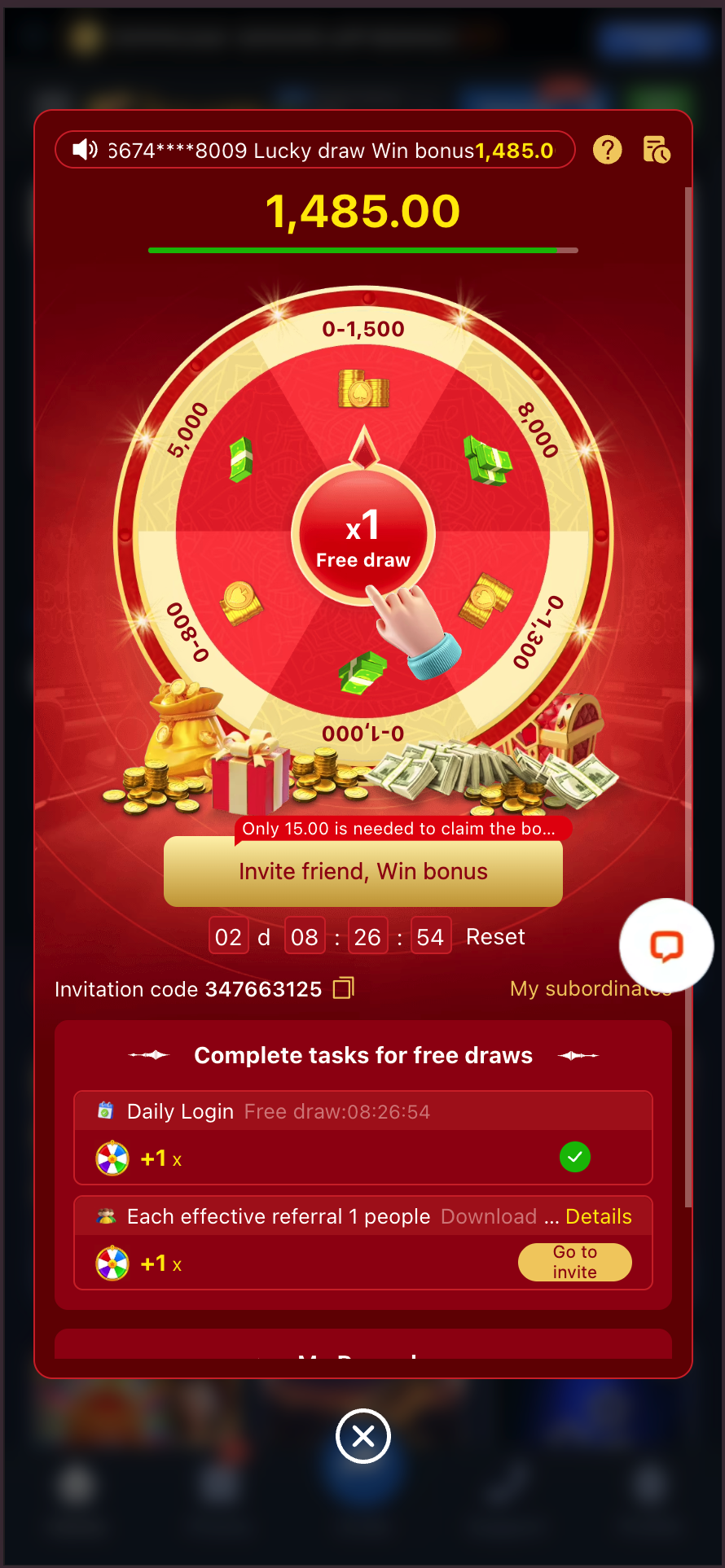
Discover the Lucky draw wheel and task-based entries, including login and invitation tasks. Entry opportunities and reward-claim requirements are shown separately in the activity.
Open Lucky draw to see the available entries, task list and activity rules for your account.
The activity view includes daily-login and effective-referral task entries. Read the task details to see what qualifies and when an entry becomes available.
Read the reward-claim requirements, deadline and any additional qualifying action before treating the displayed amount as a withdrawable reward.
The wheel labels, example results and countdown in the image belong to that captured view. Use the current activity page for your entries, period and reward record.
 Blind box
Blind Box Activities
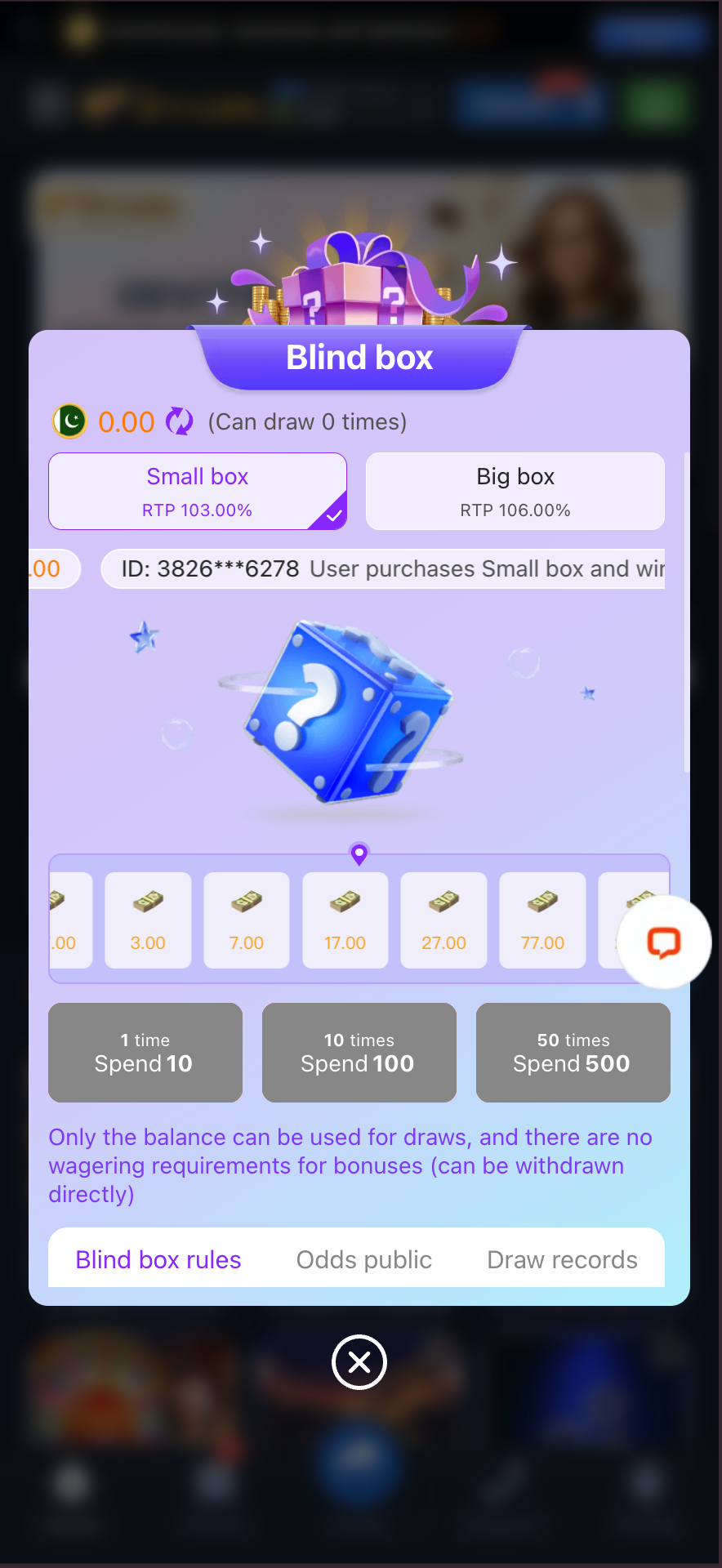
Small box or Big box? Compare the choices, published odds and draw records. Opening a box uses account balance, with the cost shown for your selected number of draws.
Choose Small box or Big box and read the cost of the number of draws selected. The displayed interface states that account balance is used for draws.
Open Blind box rules and Odds public to understand the selected option and its published reward information before participating.
The interface describes its bonuses as having no wagering requirement. Check the applicable account and withdrawal rules separately when using a credited reward.
Review Draw records after participating. A published theoretical figure, prize range or earlier result is not a guarantee of the outcome of a particular draw.
 Invitation
Invite Friends to 3RR
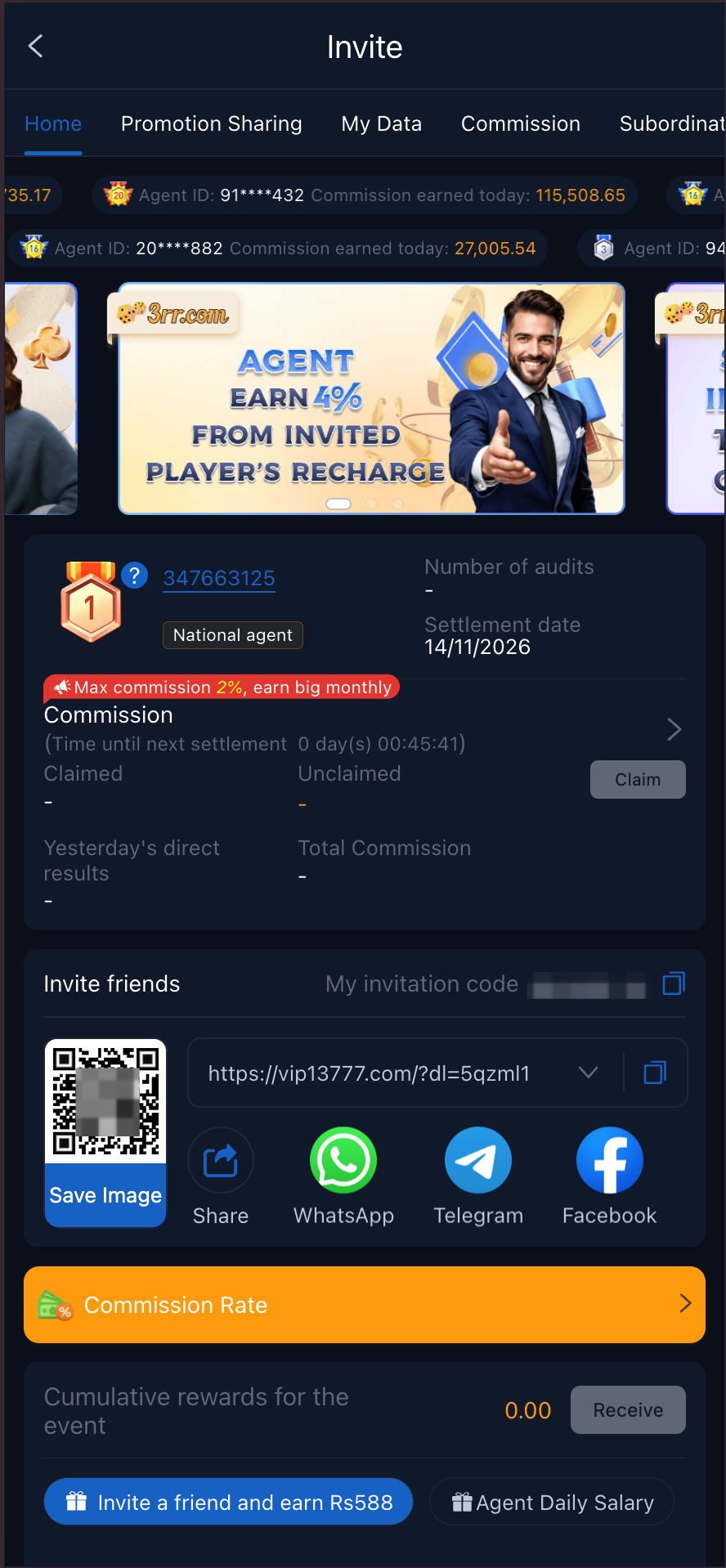
Introduce friends to 3RR through your own sharing link, code or QR tools. Find the invitation offer and the qualifying actions that can earn a reward.
Open Invite on the platform and read the friend-invitation offer associated with your account.
Use the invitation link, code or QR information assigned through your account. Confirm it belongs to you before sharing; a generic platform address may not identify the referring account.
Check the invited person’s eligibility and the qualifying actions stated by the offer. Sharing a link or a new registration alone may not complete the reward conditions.
Review the activity period, attribution rules, reward record and any claim or expiry requirement.
Share only where permitted and describe the actual offer accurately. Keep reward-use conditions separate from the invitation requirement.
 Agent
Agent Rewards & Commissions
Explore a promotion programme with sharing tools, activity data and commission records. Commission Rate shows category-based rates and the qualifications used for your account.
Open Invite for the promotion dashboard and Promo for Agent Rewards. Read the programme requirements and the account information shown in those areas.
Review Commission Rate for the relevant game category. The displayed table uses valid-member and performance fields; check their definitions and the tier that applies to your account.
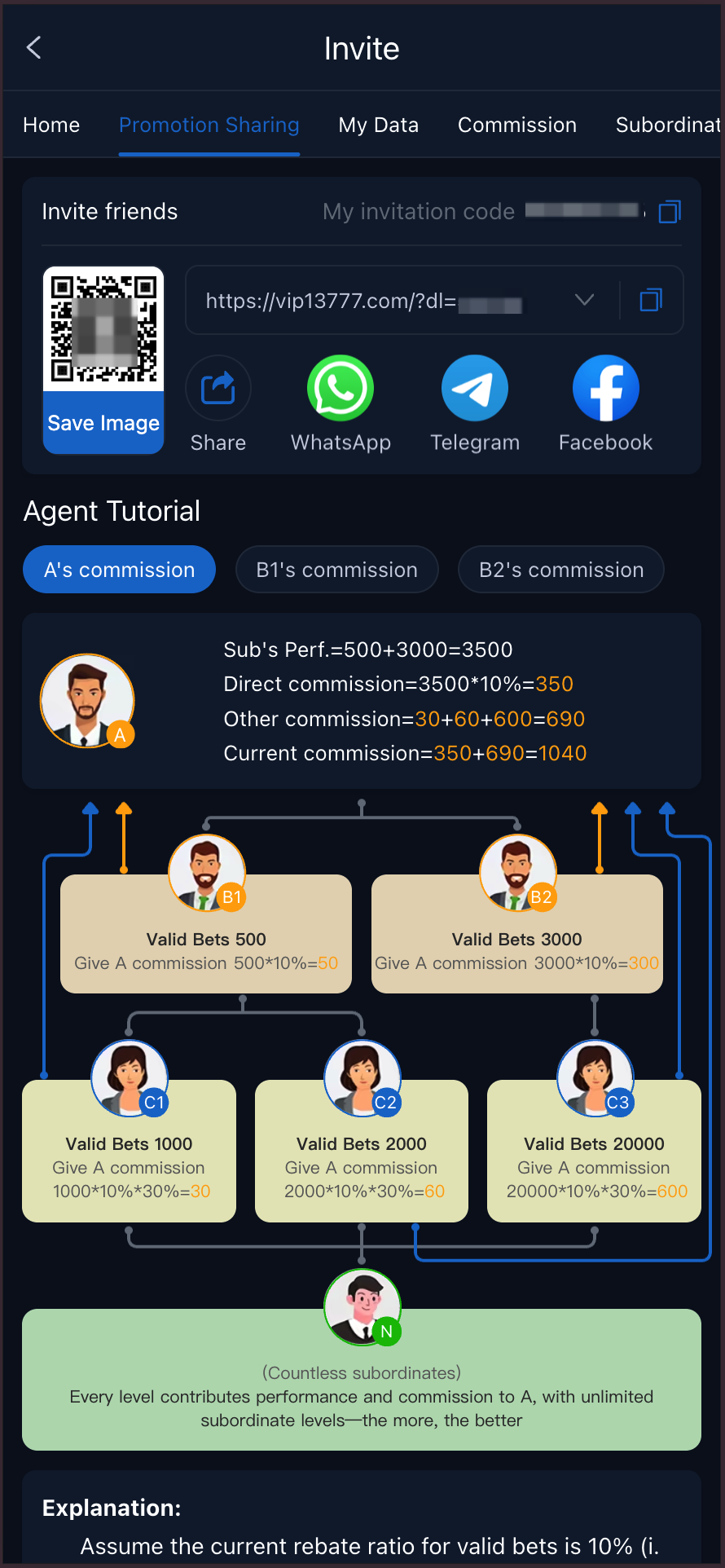
Use Promotion Sharing for the tools available to your account. Check referral attribution and qualifying activity before treating a contact or registration as commission-bearing.
Use My Data and Commission to compare activity, the calculation period and commission records. Read the settlement cycle and claim or transfer instructions shown for your account.
The Agent Tutorial includes illustrative calculations with assumed percentages. Use your account’s applicable rate table rather than copying a tutorial example as a fixed rate.
Keep promotion rewards separate from game rebates and friend-invitation bonuses. Contact platform support about an unclear attribution or commission record, with the relevant period and reference.
What Makes Each Programme Different?
- Check-in
- A seven-day consecutive reward journeyKeep seven consecutive days and use your VIP reward schedule. Open the check-in card for the Day 3 deposit requirement and reset rule.
- VIP
- Benefits linked to your account levelReview current progress, next-level requirements and the claims shown for your level. Higher VIP levels increase the check-in reward schedule.
- Rebate
- Rewards based on eligible game activityCompare the included games, qualifying measure, period and rate, then check whether a claim or automatic credit applies.
- Lucky draw / Blind box
- Separate entry and opening activitiesRead the entry source, any task or cost, available rewards and claim method before participating.
- Claim timing
- The entry, claim and expiry windowsA qualifying action, a successful claim and the deadline for using a reward can be separate stages.
- Reward use
- How the credited balance can be usedRead the reward’s balance type and usage or withdrawal conditions. Being credited does not automatically make a bonus unrestricted cash.
- Programme combinations
- Whether two benefits can be used togetherCheck both sets of rules when combining check-in, VIP, rebates or other offers; one programme’s conditions do not replace another’s.
- Friend invitation
- A reward for a qualifying invitationUse your account’s sharing details and check who qualifies, the required action and how the invitation is recorded.
- Agent commission
- A separate promotion programmeReview the category rate table, valid-member and performance definitions, attribution, commission records and settlement instructions.
From Your Chosen Programme to Its Reward Record
- 1
Choose the programme you want
Use Promo for player activities and Agent Rewards. For promotion sharing and commission information, open Invite. Choose the programme that matches your purpose before completing any task.
- 2
Check your progress and the conditions
Read the programme’s progress and rules before taking part. The VIP example below shows upgrade, daily and monthly reward information and level maintenance. For invitation or agent rewards, also check attribution and qualifying activity.
- 3
Find the Available Reward and Claim Route
Follow the selected programme’s own claim instructions. In Rebate, compare valid activity, provider entries and collectible amounts; the page notes that data updates every 10 minutes and provides a refresh option. Promotion sharing uses the details assigned to your account.
- 4
Review the reward in your account
Check the reward history or, for promotion activity, My Data and Commission. Match the same programme and period; keep the relevant claim or referral reference if you need help.
Reward Questions
Which 3RR reward programmes can I explore?
Explore seven routes: check-in, VIP, rebates, Lucky draw, Blind box, friend invitations and agent rewards. Start with the programme relevant to your own account or promotion plans, then read its participation and claim requirements.
Can VIP and rebate rewards be combined?
Only when the applicable programme rules allow it. An account may be eligible for one benefit but not another, so check both sets of conditions.
Is every draw or blind box free?
Do not assume that. Read entry requirements and any payment, task or qualifying-activity condition before opening or entering.
Where can I see agent commission rates?
Open Invite and choose Commission Rate. The page separates game categories and lists valid-member, performance and rate fields. Read the field definitions and the tier applicable to your account; percentages used in the Agent Tutorial are illustrative assumptions, not a universal commission offer.
What if a reward is not credited?
Check whether the qualifying action and claim have completed, then compare the activity record with the rule. Give platform support the programme name, time and reference.
Does a reward remove the risk of playing?
No. Promotional benefits have their own conditions and do not guarantee game results or profit.
Does 3RR check-in require a deposit?
The published 7-day check-in rule permits Days 1 and 2 without a deposit. It requires a 100 PKR deposit before checking in on Day 3 and states no additional deposit is required for Days 4 to 7 under that rule. Other programme and reward-use conditions remain separate.
What if I miss a check-in day?
The programme rule says an interrupted streak resets and restarts at Day 1. Check the progress and next eligible claim on your account instead of assuming the sequence continues automatically.
Why does another account show a different check-in reward?
The programme links the total reward to VIP level. Compare the schedule for your own account; another account's display or the largest advertised percentage does not establish your reward amount.
Does meeting the check-in requirement make a reward withdrawable?
Not automatically. The participation conditions explain when you can check in; any separate balance, usage and withdrawal rules must be read for the credited reward.
Where can I find the activity centre and reward history?
Use Promo for the activity centre and its reward history controls. For invitation and agent activity, use Invite, then review My Data or Commission for the relevant programme and period.
How do friend invitations differ from agent commissions?
A friend-invitation offer rewards the action defined by that campaign. The agent programme provides promotion sharing, data and commission sections, with category-based qualification and calculation information. A referral can be visible without meeting every reward condition; check each programme separately.
Your Rewards and Sharing Tools Are on 3RR
Open 3RR and choose Promo for activities or Invite for sharing and commissions. Find your programme, see your progress and follow its claim instructions.